Technology Bites

  • Home
  • Tech
    • Software
    • Browsers
    • Google
    • Internet
    • Windows
  • Mobile
    • Android
    • Apple
    • Windows Phone
  • Products
    • Phones
    • Tablets
  • TIP US
You are here: Home / Tech News / Frengly: Free Translation Service

Frengly: Free Translation Service

Frengly is a free translation service that is based on Google Ajax Language API. I don’t know why people wants to use Frengly instead of Google translate itself, the only advantage of using Frengly over Google translate or Live translator is it auto detects the text language you input in to the box.

Frengly is simple to use, just paste the text you to translate in the text box and click the language to get translation, it auto detects the language and translates. The translation is fast and since it is based on Google translate the results are same. You can quickly access all your translations using “Your Translations” link in the top menu

One possible use for this app is, when you want to translate text in unknown language to your language. Google translate doesn’t support language detection yet, although API has a class for that.
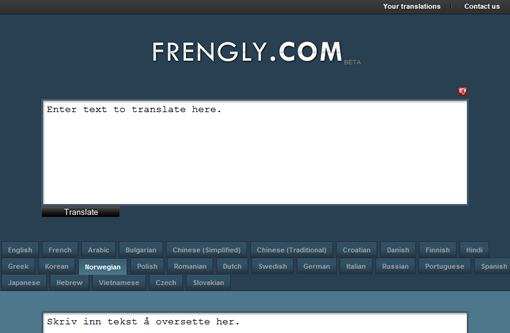
Frengly Translate Text

Share this:

  • Tweet

Related

About Ram

I am a blogger and Technology Enthusiast. I write about software, tech news, gadgets. You can reach me at ram@teknobites.com, follow me on Google+ or on Twitter

« Update from Gmail team on security
How to setup multiple HTML signatures in Gmail »

Top Posts

  • Nokia Lumia 720 Review
  • Apple working on Larger and Curved Screen iPhones for 2014
  • Google using a Bouncer to keep malware out of Android Market
  • Oppo N1 launched in India at Rs 39,999
  • Firefox 10 released with developer tools and full-screen API
  • 10 Free Scripts to Create Your Own Url Shortening Service
  • Micromax to assemble phones in India starting next year
  • Polaris: Google Analytics Dektop App
  • Bluetooth LE support will come to all Lumia WP8 Phones with Black Update
  • Wordpress Image Uploader crashes Firefox, how to fix it

About Us · Archive · Disclaimer & Privacy Policy · TIP US · Copyright © 2025 · Technology Bites